EEG · ERP · connectivity · sources · patch-clamp
Biosignal analysis, inside the browser. Your data never leave the computer.
Abstract
Hertz is a program for analyzing EEG recordings and cellular current traces. It opens like a web page but works on the user’s own computer: there is nothing to install, no file is sent to a server and, after the first visit, it works without a connection too. It covers the whole path, from opening the recording to the figures and the report for a publication, and its results are checked automatically against the reference programs of the field.
- 0bytes of signal sent to a server
- 12import formats, EEG and electrophysiology
- 16/16automatic checks passed
- MNE · EEGLAB · ERPLABthe reference programs Hertz is compared with
1Three design choices
Three choices that matter to whoever adopts it
1.1Local
The data never leave the laboratory
The computing happens on the computer of whoever uses Hertz, not on a server. No recording leaves the laboratory: this simplifies protecting participants’ data and lets the application be used on a closed network or with no connection at all.
1.2Hertz Core
A processing engine that uses the computer’s full power
An ordinary web page uses a small part of the processor. Hertz Core, the application’s processing engine, uses all of its units at once and keeps the interface separate, so it keeps responding while the computation proceeds. In practice: large files, with hundreds of channels and hours of recording, open and are analyzed on the laboratory laptop, without buying or installing anything else.
1.3Validation
Results are verified against the reference programs
Every function that also exists in MNE, EEGLAB, ERPLAB or scipy, the reference programs of the field, is run on test data whose right answer is known, in Hertz and in the reference program, and the two answers are compared. The comparison is an automated test that can fail, not a claim: the numbers are in section 6.
2Installation
What it costs to have the tool ready
Even before the first file is opened, a tool has a cost: what to download, what to install, who keeps it updated, which licenses are needed. Here is Hertz next to MNE (Python) and EEGLAB (MATLAB), the two most used tools in the field.
2.1Sizes and installation
Sizes measured on the disk of the test machine, not taken from the vendors’ sites.
| Item | Hertz | MNE (Python) | EEGLAB (MATLAB) |
|---|---|---|---|
| Download | 33 MB on the first visit, in the background; the first 3 MB are enough to start working | Python with numpy, scipy, matplotlib and MNE: 180 MB of packages, 0.5–1 GB with the environment (856 MB measured) | MATLAB, several gigabytes with toolboxes; the MATLAB Runtime alone is 2.8 GB, plus EEGLAB 407 MB |
| Installation and set-up | None: an address in the browser and the licence in a field | A Python environment, its packages, an editor; the work is done by writing scripts | MATLAB installation with account and licence; EEGLAB added to the path, plugins downloaded separately |
| Updates | Automatic, downloading only what has changed, applied on confirmation | By hand, from the command line, one environment at a time | By hand, version by version |
| What is needed | A recent browser (section 7) | Python 3.10 or later and some ease with the command line | A MATLAB licence, with the Signal Processing Toolbox for many functions |
3Speed
How long it takes to compute
The other half of speed is measured while the tool is working: how long one waits for a result. Same operations, same data, same computer, for Hertz and for the two reference tools.
3.1Computing
Same operations, same data, same computer (Apple M1, 8 cores). Median time over repeated runs, measured during the same comparisons as in section 6.
| Operation | Hertz | MNE / Python | EEGLAB / MATLAB |
|---|---|---|---|
| Welch PSD, 65,536 samples | 1.2 ms | 3.5 ms | 101 ms |
| Band-pass filter | 1.8 ms | 1.2 ms | 14 ms |
| STFT spectrogram | 2.9 ms | 1.9 ms | 16 ms |
| Wavelet scalogram | 324 ms | 212 ms | 252 ms |
| Hilbert spectrum | 102 ms | 205 ms | 207 ms |
| PAC comodulogram | 98 ms | 390 ms | 405 ms |
| Full feature battery, 32 channels × 32,768 samples | 58 ms | 22.8 s | 3.5 s |
How to read the table. In the first rows MNE is slightly faster: those operations are a single call into an already optimized library, and the difference, one millisecond, is not noticeable. In the rows at the bottom, where the analysis repeats the same step thousands of times, Hertz is tens to hundreds of times faster: 58 milliseconds against 23 seconds. The Hertz times in the table are measured on a single unit of the processor, because that is how the automatic bench runs; in the application the engine uses all of them.
3.2Why compiled
For those who want to know where the difference comes from: it can be skipped without missing anything.
Interpreted
Python and MATLAB translate as they go
Python and MATLAB translate each instruction at the moment they execute it, like an interpreter translating sentence by sentence. That is fine when the work is one large operation, handed to an already translated library. When instead the analysis repeats a step thousands of times, for every channel, for every window, each repetition is translated again, and on one unit of the processor at a time.
Compiled
Hertz Core is translated once
Hertz Core is translated once and for all, before it is distributed, into the language the processor executes directly. When a file is opened there is nothing left to translate, and the repetitions are shared among all the units of the processor. The effort is made by whoever writes the program, not by whoever uses it.
In practice
The time you feel
An analysis that in Python is a script to launch and wait for is, in Hertz, a panel that responds while you change a parameter. And before that: MATLAB starts in tens of seconds, a Python environment has to be activated; Hertz is a browser tab that is already open. Those are the times that matter in a day in the lab, not the milliseconds in the table.
3.3The browser as a platform
Why an application that works locally can live in a web page.
Compiled in the page
The engine runs on the processor, not in the browser’s interpreter
For some years now browsers have been able to run programs already translated for the processor (the WebAssembly standard), not just pages. Hertz Core ships that way: the page downloads it once and from then on every computation happens on the user’s own computer, in times of the same order as an installed program. The table in 3.1 puts them next to scipy, which is translated the same way.
In parallel
Every core, one memory, the graphics card
Modern browsers let a program work on all the units of the processor together, on the same data, without copying them: a file of millions of samples is read once and worked on by all the units at the same time, while the interface stays on a separate path and keeps responding. Where the browser makes the graphics card available (WebGPU), part of the computation runs there.
Everywhere
One program, the same on Windows, macOS and Linux
The browser is the layer that makes the systems equal: Hertz is a single program that opens from an address, with no installation and no separate versions for Windows, macOS or Linux, on the laboratory laptop as on the desktop workstation. It reads files directly from the disk, updates by downloading only what changed and, after the first visit, works without a network too, because the browser keeps the whole application on the computer.
4Features
The features, area by area
The lists below are for specialists: the line under each title says in one sentence what that area is for. Next to each entry a label says how widespread it is in the most used EEG tools (EEGLAB, MNE, Brainstorm, BrainVision Analyzer).
- common all the main tools have it
- rare in a few tools, often as an add-on
- near-exclusive not known to us in any other EEG tool with a graphical interface
4.1Import and export
Reads the formats of clinical, research and cellular electrophysiology recording systems, preserves events and montages, and returns publication figures, exportable data and a session report.
- EDF / EDF+with annotations; the most widespread clinical format common
- Axon ABF 1 and 2pClamp, multichannel, units and sampling rate detected automatically rare
- NeuroExplorer NEX, HDF5 (g.tec g.HIamp)continuous traces, events and intervals rare
- CSV / TXT / DIF, int16 binary, WAV, I/Q, ThinkGearwith selection of the data column and of the event channel common
- BIDS events and montageselectrodes.tsv, channels.tsv, coordsystem.json; 10-05, GSN-HydroCel 32–129, Biosemi and EasyCap layouts common
- Full session as .hzz / .haesignal, sequence of steps, markers and montage in the same file rare
- Export to EDF, ABF, WAV, CSV, HDF5 LabHDF5 organised by unit, condition and trial, with provenance rare
- Scientific figuresPNG from each chart, paper presets, light or dark theme, metadata in the footer rare
- Batch: the same sequence of steps over many filesapplied to a whole folder of EDF files rare
- Research Reporta printable HTML report: statistics, spectrum, complexity, raw/processed comparison rare
4.2Preprocessing and cleaning
Filtering, re-referencing, channel repair and artifact removal (ocular, muscular, cardiac, mains) with ICA and subspace methods. Every step enters the History: it can be disabled, undone, re-run and exported, and carries a consistency check on its output.
- Butterworth IIR filters (zero-phase) and windowed FIR filtershigh-pass, low-pass, band-pass, band-stop; notch and harmonics; CleanLine common
- Referencing: CAR, robust CAR, median, mastoids, custom pool, REST (approximate)and spatial transforms: bipolar, Hjorth CSD, spherical spline CSD common
- Bad channels: detection and repairvariance, flat, correlation; interpolation from neighbors common
- EOG / ECG regression, SSP projectors common
- ICA (FastICA) with component reviewsorting by kurtosis/variance, automatic markers, save/load common
- Subspace Rescale (ASR-like)from a clean calibration segment it derives the principal components and their typical amplitude; then, window by window, it brings the components that exceed the threshold back down to it. It attenuates rather than reconstructing from the clean subspace as EEGLAB’s ASR does: more conservative, and it does not invent signal common
- Single-channel cleaning: SSA, wavelet, Embedding ICAfor single-channel recordings, when a separation is still needed rare
- Epoch rejection with EEGLAB conventionsamplitude, peak-to-peak, gradient, drift, flat, joint probability, kurtosis common
- Sanity check after every stepthe History compares the output and the input of each step: energy in dB, lost or non-numeric signal, anomalous blow-ups or attenuations, residual DC component after a detrend; every row of the History carries a PASS / WARN / FAIL outcome rare
- Downsampling with FIR anti-aliasingalso at import, for the largest files common
4.3Spectrum and time-frequency
Power spectra and time-frequency representations, from the Welch estimate to wavelets and synchrosqueezing; phase-amplitude coupling with a surrogate test; complexity measures over time.
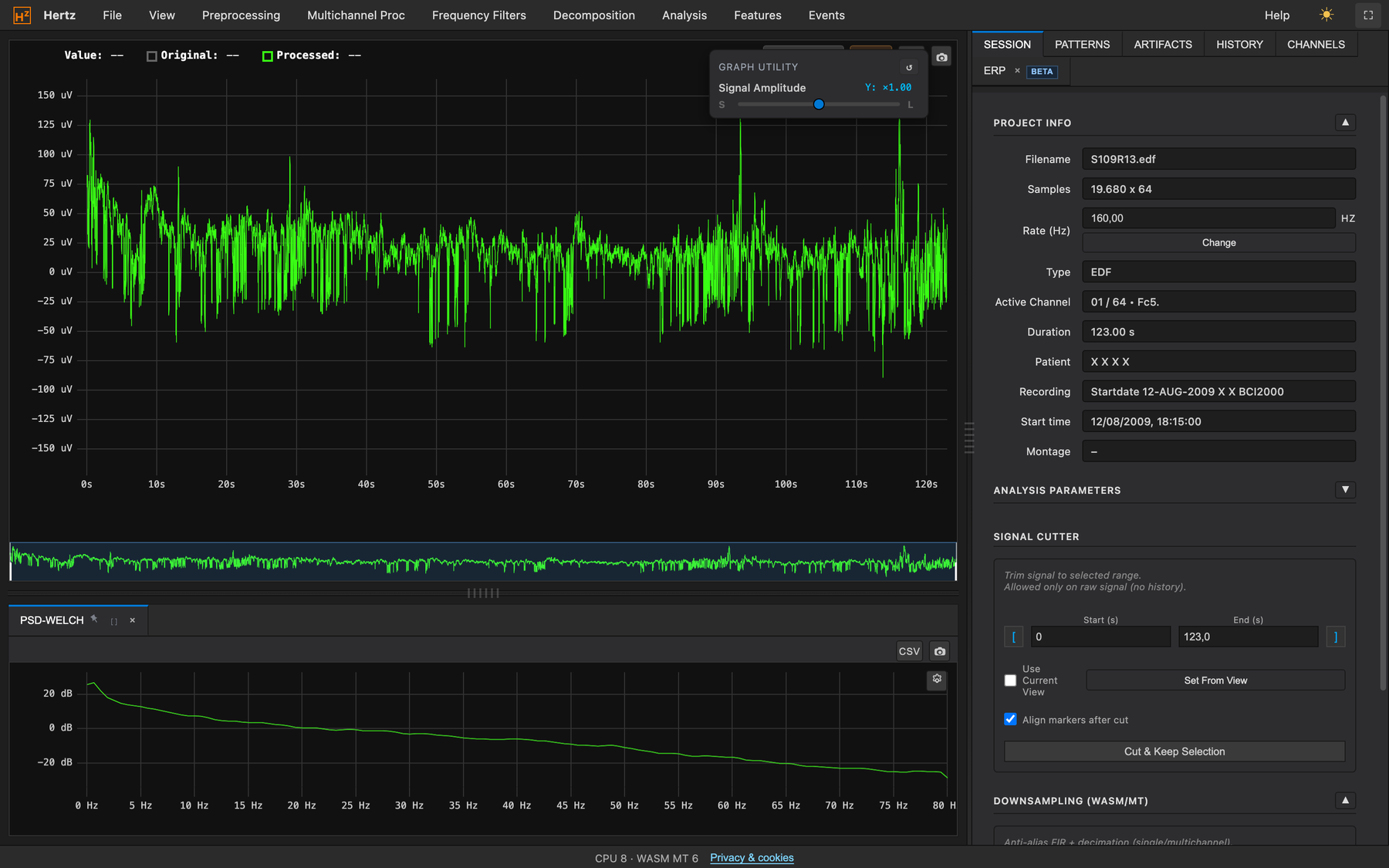
- FFT, Welch PSD (absolute and in %), band histogram common
- Multitaper PSD (DPSS)for short segments with little leakage common
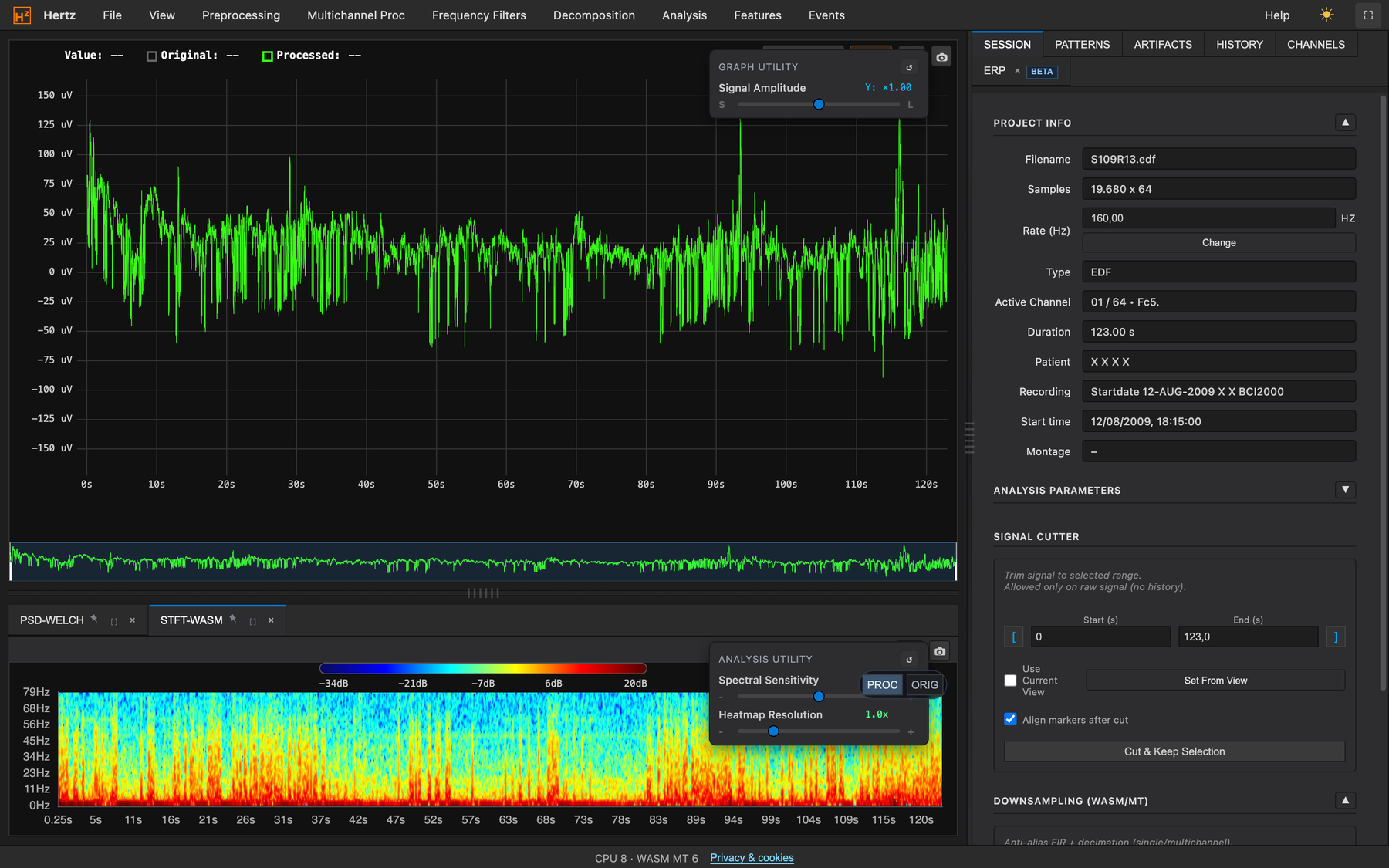
- STFT spectrogram and wavelet scalogramdrawn separately, without blocking the interface; adjustable resolution common
- Synchrosqueezing (SST)time-frequency with sharp ridges rare
- Hilbert spectrum and HHTinstantaneous amplitude and frequency per band rare
- Phase-amplitude comodulogram (PAC) with surrogatesthe surrogate significance test is built into the panel rare
- Complexity over timeSample Entropy, Permutation Entropy, LZC, Higuchi, DFA, Hjorth rare
- Sonification of decomposition layersa band or a layer can be listened to near-exclusive
4.4ERPs and per-trial statistics
Event-related potentials with the average and, next to it, the standardized measurement error, split-half reliability and the reliability/number-of-trials curve: how much the average is worth and how many trials are needed, estimated on the session data.
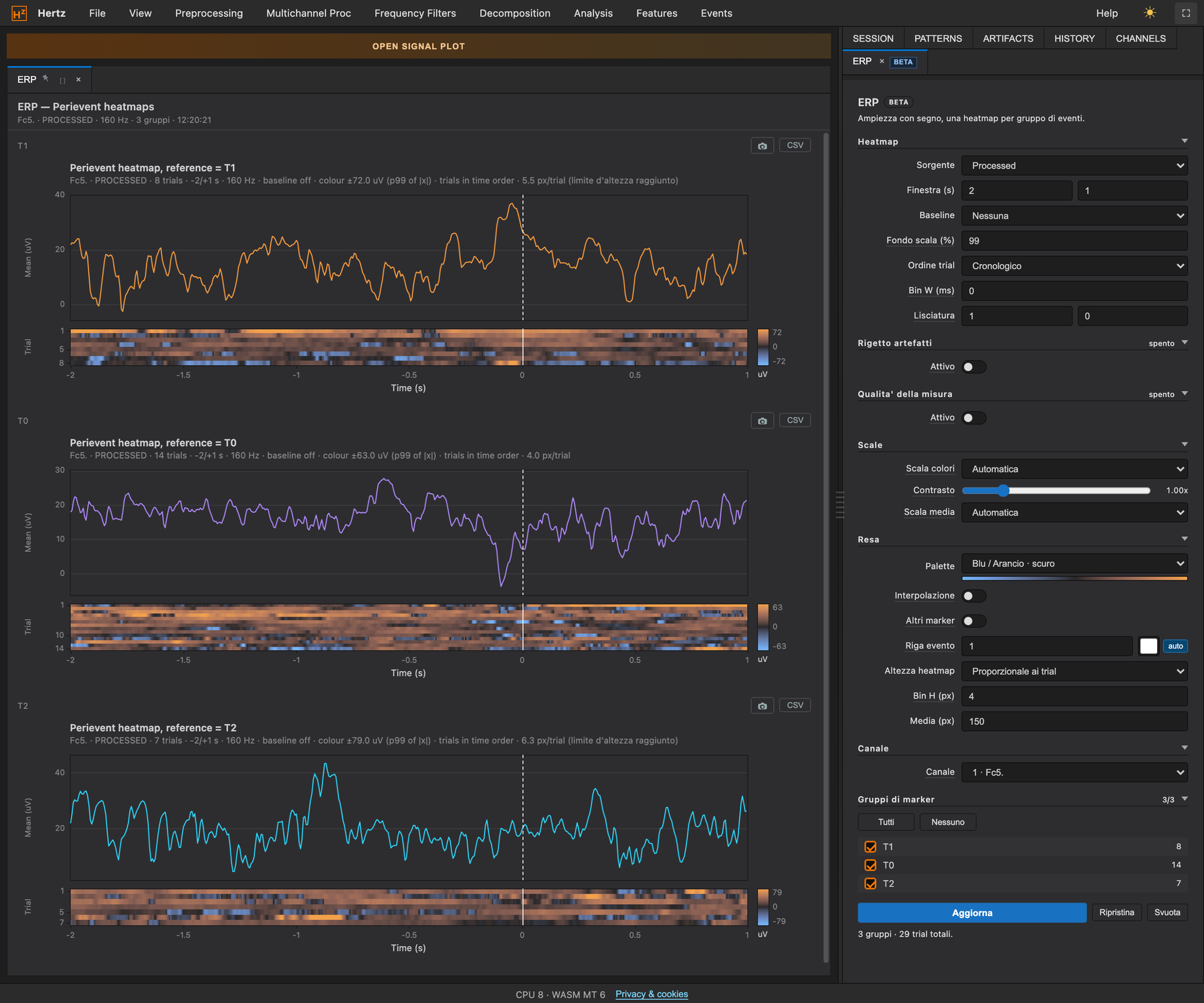
- Peri-event ERP: mean ± SEM and signed trial heatmapbaseline, sorting, diverging palettes, context markers with median and IQR common
- Standardized Measurement Error (SME)the error of the ERP measurement, analytic and bootstrap, verified against ERPLAB rare
- Split-half reliability and reliability-versus-trials curvehow many trials are needed, estimated on the session’s own data near-exclusive
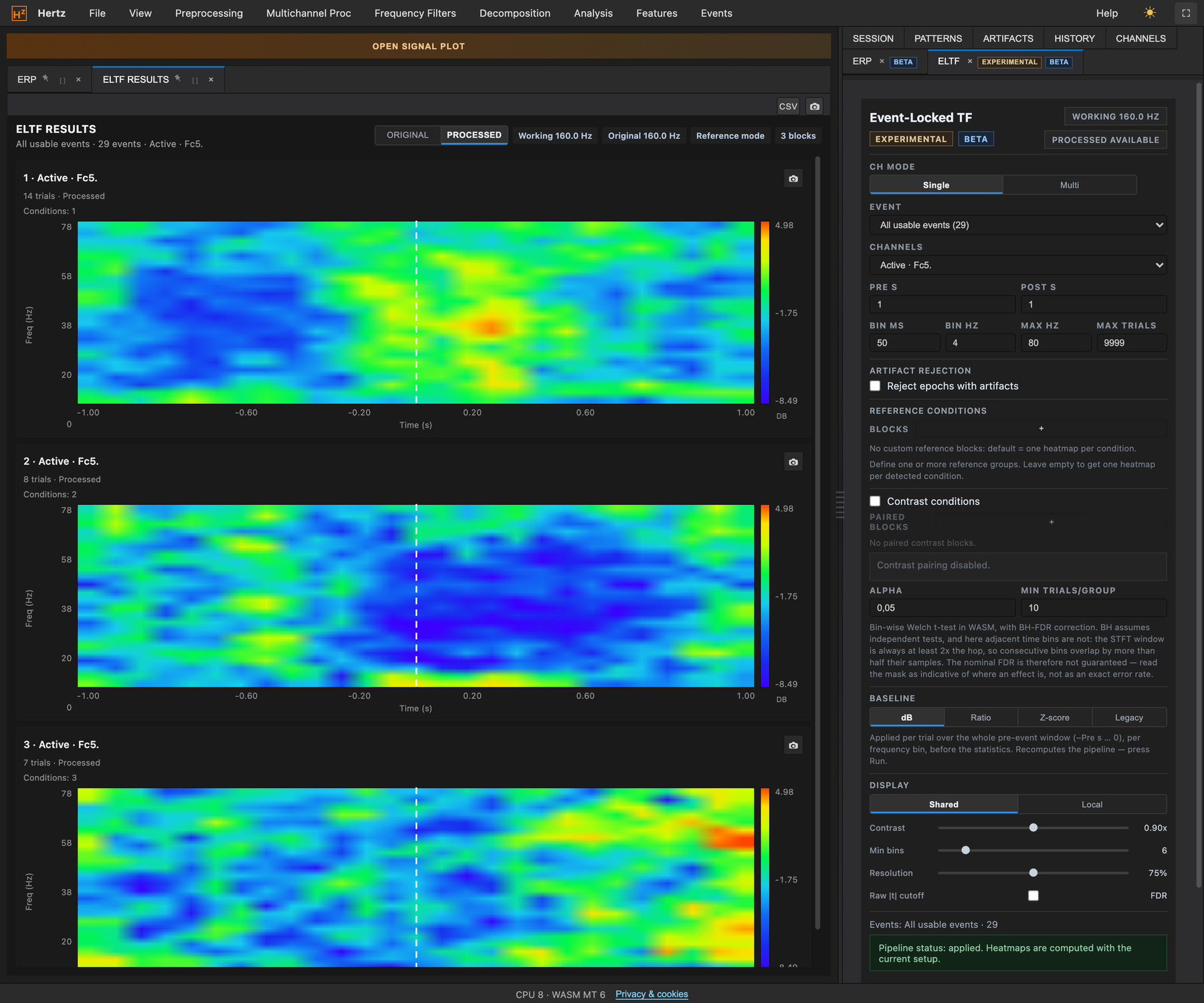
- Event-Locked TF with statistical contrasttwo conditions, Welch’s t per pixel, FDR correction, five maps rare
- Spectral Counterbalanceidentifies, in a data-driven way, the bands that rise and fall in compensation around an event, and quantifies them near-exclusive
- Automatic pattern searchrecurring motifs, single-channel and multichannel rare
4.5Connectivity, topographies, sources
Functional connectivity between channels with measures robust to volume conduction and a permutation null distribution; 2D and 3D topographic maps; source localization with a declared research-only model.
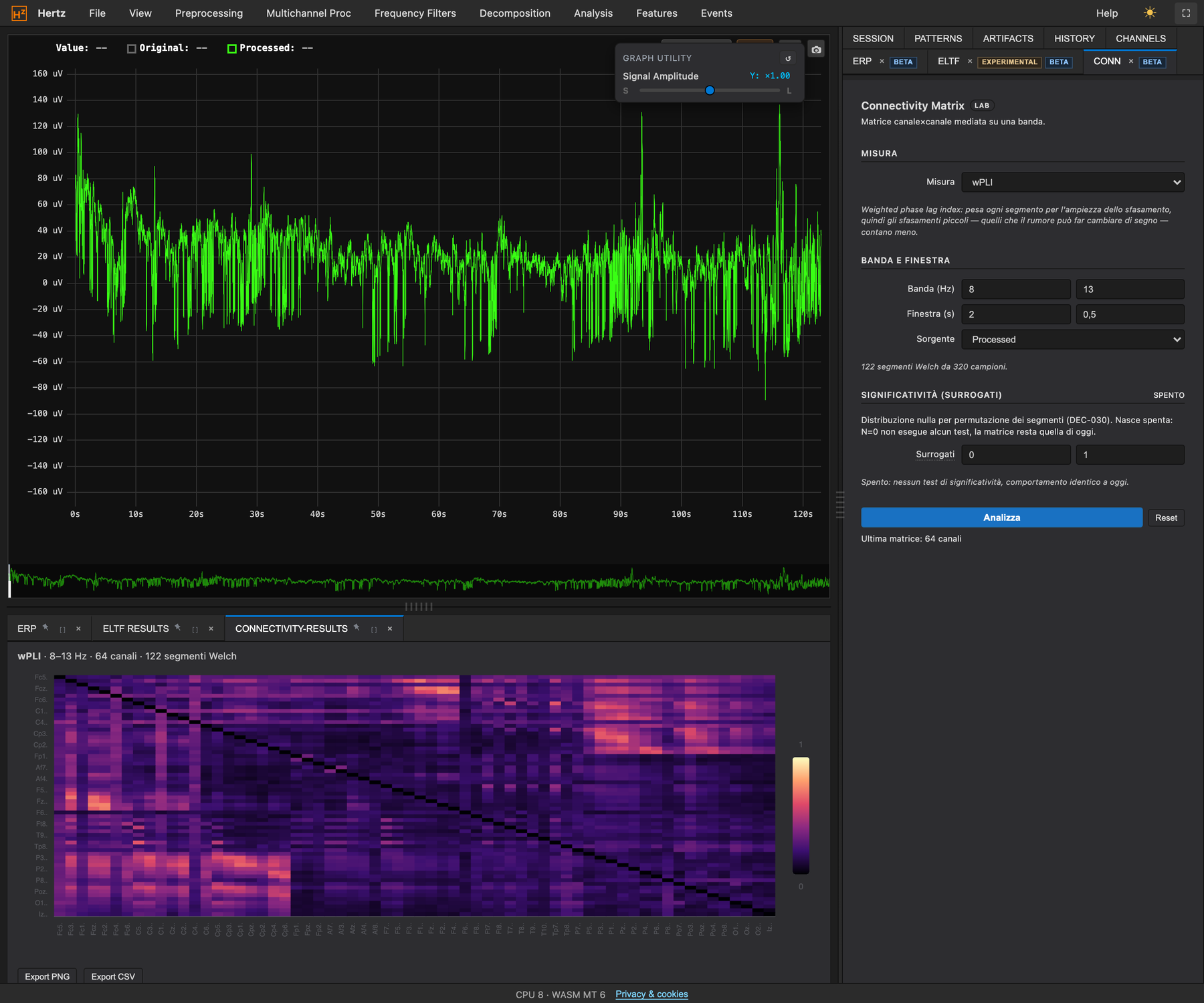
- Connectivity matrix: wPLI, dwPLI, PLI, imaginary coherence, ciPLV, coherence, PLVper band and window, with a permutation null distribution rare
- GFP, RMS difference, pairwise PLV common
- Neuro View: 3D head and 2D maps with playbackGaussian or IDW interpolation common
- Map Inspector: three snapshots, before / now / after rare
- sLORETA / eLORETA sourcesmodels for the most common montages, MNI152 slices, atlas; the head model is spherical and the feature is declared research-only rare
4.6Cellular electrophysiology
Patch-clamp analysis in the same application as the EEG: from current noise to single-channel properties (unitary current, number of channels, open probability), with an operating protocol for each analysis.
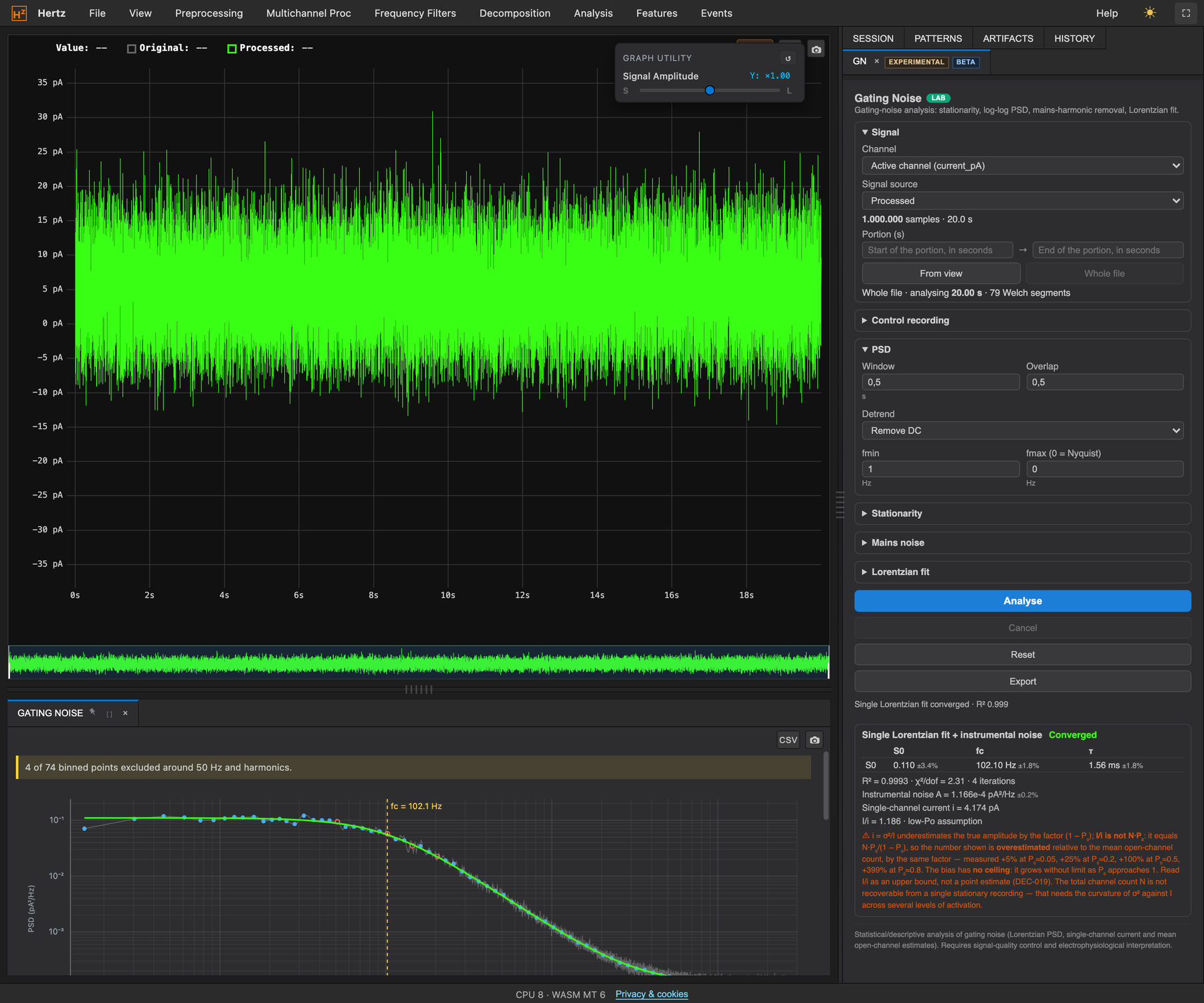
- Gating Noisefrom voltage-clamp current noise to the channel’s time constant: stationarity, spectrum, Lorentzian fit with instrumental noise, control subtraction, unitary current near-exclusive
- ML-NSFAmaximum-likelihood non-stationary fluctuation analysis on evoked currents: unitary current, number of channels, open probability at the peak near-exclusive
- An operating protocol for eachwhat to record, which options to enable, how to read and report the result, including the case where the data do not support it rare
4.7Live
Real-time acquisition from a serial headset, with a live spectrogram and event marking: a secondary feature, for teaching and quick trials.
- Serial acquisition from a ThinkGear headsetscrolling chart, live STFT, event marking from the keyboard, session saving common
5Screenshots
Screenshots
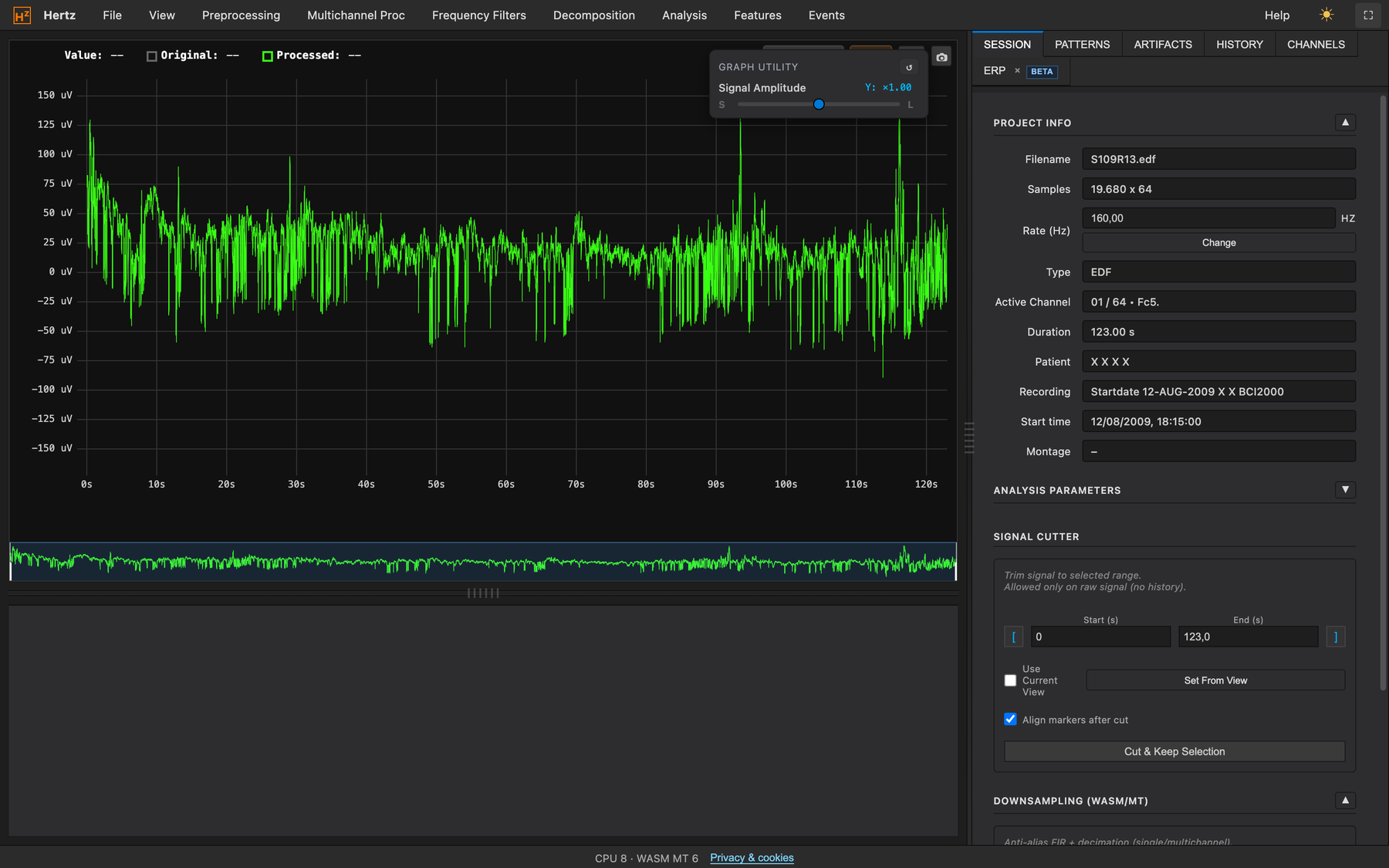
Figures 1–6: public PhysioNet EEG Motor Movement/Imagery recording (BCI2000), subject S109, 64 channels at 160 Hz. Figure 7: simulated current trace at 50 kHz with known parameters, the same one used on the validation bench.
6Comparative tests
The same data, in Hertz and in the reference tools
For every function that also exists in a reference program, an automated bench generates test data whose right answer is known, has Hertz and the reference program analyze them, and compares the results. The results are archived together with the program, version by version; a comparison that was not run does not appear in the table. How to read the outcome: 100 means the same result as the reference; “identical” means equal to the last digit.
| Function | Reference | Outcome |
|---|---|---|
| Welch PSD | EEGLAB (MATLAB Runtime), MNE | Identical to EEGLAB (correlation 1.000000, NRMSE 0); MNE 99.2/100 owing to window conventions |
| PAC comodulogram (Modulation Index) | MNE, EEGLAB, tensorpac | Identical to MNE (correlation 1.000000); EEGLAB 0.998; surrogates: verdict in agreement with tensorpac on both the null and the coupled case |
| Hilbert spectrum | MNE, EEGLAB | 99.9 / 97.3, correlation 1.000000 with MNE |
| STFT spectrogram | MNE, EEGLAB | 98.8 / 99.0, correlation 1.000000 with EEGLAB |
| Wavelet scalogram | MNE, EEGLAB | 98.0 / 98.2 |
| IIR band-pass filter | MNE, EEGLAB, scipy | 98.5 / 96.5; poles coincide with scipy to within 10⁻¹³ |
| The application’s FIR kernels | scipy.firwin, MNE, EEGLAB | Coincide with scipy.firwin; cutoff within 0.005 Hz of the EEGLAB kernels; phase symmetric to within 10⁻¹¹ |
| DPSS multitaper | scipy | Identical tapers to within rounding |
| Multichannel features | MNE, EEGLAB | 99.9 / 99.9 |
| ERP SME (Luck 2021) | ERPLAB sme_analytic, executed | Relative deviation 2·10⁻⁸; bootstrap within 1.4%; split-half within 0.006 |
| Connectivity (7 measures) | mne-connectivity | Maximum deviation 8·10⁻⁴ across six measures; “sensitive to volume conduction” classification in agreement |
| Epoch rejection | EEGLAB (jointprob, rejkurt, rejtrend, eegthresh), MNE | Same conventions, same outcomes; the EEGLAB functions are executed, not transcribed |
| Gating Noise — spectrum, fit, variance–mean | scipy, MNE, EEGLAB (pwelch + fminsearch), analytic ground truth of a two-state process | PSD within 10⁻⁵ of all three; corner frequency within 3% of the true value and within 1% of the other optimizers; on a recording with no measurable gating Hertz declines to fit, the generic optimizers do not |
| ICA (FastICA) | MNE FastICA, EEGLAB runica, MNE extended Infomax | Source recovery identical to MNE (median correlation with the true sources 0.996, minimum 0.986; EEGLAB runica 0.979); with 16 sources in 16 channels every tool stops at 0.66 |
| Bad channels | pyprep (NoisyChannels) | F1 0.71 versus 0.41 on a synthetic 64-channel montage (recall 0.83 versus 1.00, precision 0.63 versus 0.26) |
| Subspace Rescale (ASR-like) | EEGLAB clean_rawdata (ASR) | On synthetic 64-channel bursts: residual on the artifact 1.56 versus 2.66 (RMSE), clean stretch 0.0008 versus 0.029; a comparison on a single dataset, not a ranking |
| Overall outcome of the checks | 8 comparisons, 2 mandatory references | 16/16 checks passed, mean 99.3/100 against MNE and 97.8/100 against EEGLAB |
Source localization (sLORETA/eLORETA) is verified against the published formulas and, by choice, not against MNE: the head model is simplified and the feature is declared research-only. All the results in this table were recomputed on 16 September 2026 with the Hertz Core version in use.
7Platform
Technical notes
| Where it runs | On a Windows, macOS or Linux computer with an up-to-date browser, installing nothing: Chrome or Edge from version 91, Firefox from 114, Safari from 16.4 (chart at the end of the section). |
| Engine | Hertz Core, the application’s processing engine: uses all the units of the processor together and keeps the interface responsive even with large files. |
| Data | Stay on the computer: no file is uploaded to a server; sessions are saved to the local disk in the Hertz formats. |
| Offline | After the first visit the application works without a network; updates download only what has changed and are applied when the user confirms. |
| Reproducibility | Every session remembers the steps performed; the sequence can be saved, repeated on other files and attached to a publication, so a result can be redone. |
| Privacy | Only optional analytics cookies, with a consent banner; no advertising cookies, no profiling. |
| Intended use | A research and teaching tool. It is not a medical device and must not be used for diagnosis. |
| Further information | For a format not listed here, an unusual montage, or use on a specific protocol: hertz@wavehub.it. The people who wrote the application will answer. |
Fully works Does not start
Versions according to caniuse.com and MDN as of 16 September 2026. On iPhone and iPad every browser uses Safari’s engine. Live acquisition from a serial port is available in Chrome, Edge and Firefox from 151.
The browser you are reading with
Hertz Core, the processing engine of Hertz, and the application’s graphics and user interface (UX/UI) are the intellectual property of Patrizio Anselmi and Isabella Zironi, since 2025. All rights reserved.